
The HirePlanner AGENCY PORTAL offers two (2) types of users accounts and access:
- The Account Owner account
- The Agency Consultant accounts
1) THE "ACCOUNT OWNER" USER:
The "Account Owner" is the main contact person and representative for your agency.
THE ACCOUNT OWNER IS RESPONSIBLE FOR THE FOLLOWING:
- Creating user accounts for new agency consultants and de-activating user accounts from retired consultants
- Activating new clients and de-activating old clients
- Assigning appropriate consultants to their respective clients
- Updating agency company profile
- Updating promotional plan and customize information
HOW DOES YOUR HR CLIENTS VIEW YOUR AGENCY PROFILE?
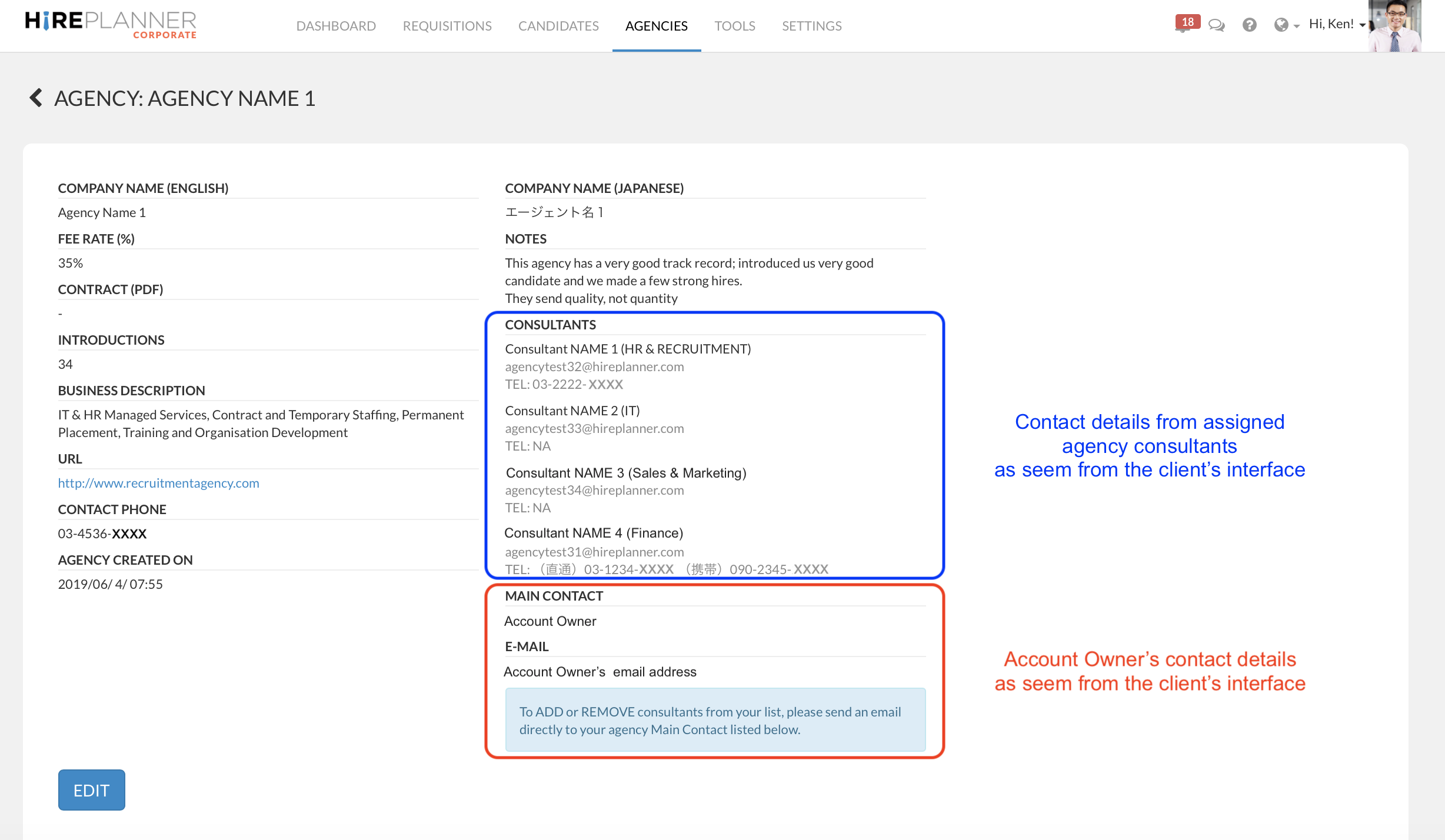
Once your settings are complete and after you assigned each consultant to their respective client(s), the view of your agency profile from the HR client interface will look as attached below.
As illustrated on the screenshot below, and in an effort to help your HR clients be responsive, they will have access to the name, email address, phone number and specialities of the consultant(s) you have assigned to work for them and the Account Owner's email contact details so that they can reach out to him/her if/when they need assistance to add/remove consultants from the list.
HOW TO CHANGE THE "ACCOUNT OWNER":
The Account owner is often the first person who registered the agency account online. If, at any time, you would like to assign someone else in your team to be the Account Owner to manage your list of consultants, please contact us at support@hireplanner.com and provide us with the following information:
- company name
- Current account owner's name and email address
- Name and email address of the new account owner (please make sure the user is already registered on your hireplanner account).
We usually can complete your request with 1 to 3 business days.
2) THE AGENCY "CONSULTANT" USER:
- The “Consultant” user accounts are reserved for recruiters from your agency.
- Consultant accounts MUST BE CREATED BY THE ACCOUNT OWNER OF THE AGENCY; Consultants cannot create new users in the system; only the account owner can.
- Each Consultant should have its own dedicated user account (One ID and one Password per user).
- Once consultant accounts are created in the system, agency consultants will be able to select and activate the clients they wish (or are allowed) to work with.
Comments
0 comments
Please sign in to leave a comment.