
To help you keep track of all the tasks you have assigned to other people involved in the hiring process, we have created a Task Management Tool for you to more easily distinguish between the tasks that are still outstanding and the ones that have been completed (Done).
HOW TO ACCESS THE LIST OF TASKS YOU HAVE ASSIGNED TO OTHER COLLEAGUES:
1) Click on the "Bell Mark" the top navigation menu
2) Click on the button called "Tasks I've assigned to others"
3) Select the type of requests you need to review (Screening, Interviews, Requisitions or Offers)
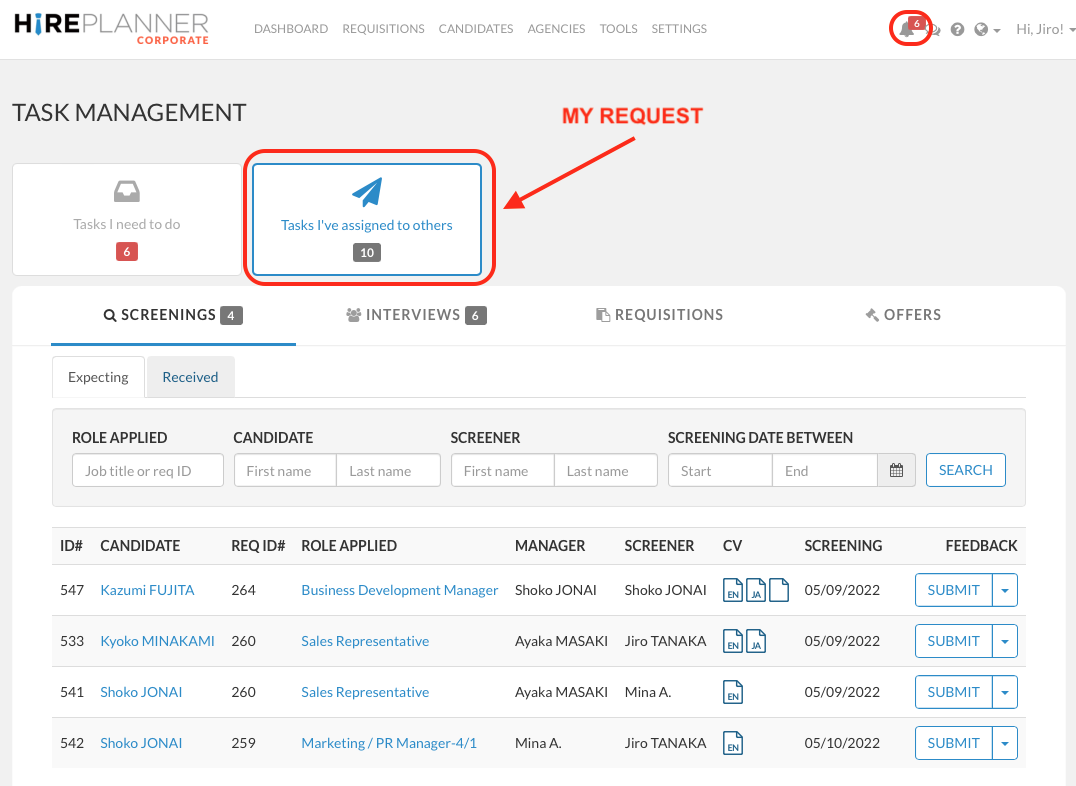
"TASKS I NEED TO DO" displays the list of action items the HR recruiter needs to complete
"TASKS I'VE ASSIGNED TO OTHERS", on the other hand, displays the list of action items the HR Recruiters has assigned to other members of the team who are involved in the hiring and selection process.
This section was designed to help Recruiters and Supporting Recruiters keep track of the requests they have assigned and easily spot tasks that may be overdue.
IMPORTANT NOTE
"TASKS I'VE ASSIGNED TO OTHERS" is a section that is ONLY available for HR Recruiters or Supporting Recruiters in charge of some requisitions since they are the only users who can assign tasks to other employees such as:
1) Screen candidates' resumes
2) Share their feedback after an interview
3) Approve a new headcount and/or
4) Validate a new offer
Because the system (as it is today) doesn't allow Hiring Managers and Interviewers (Non HR Staff) to assign recruiting tasks to other employees, non HR people will not be able to access the "My Requests" section.
Comments
0 comments
Article is closed for comments.