
Previously, when scheduling interviews, the HirePlanner system ONLY offered HR Recruiters the possibility to share candidate interview feedback with other interviewers inside the organization. Sharing resume screening feedback was NOT possible on previous versions of the website.
⚠️ Thanks to this new update, HR Recruiters are now able to share BOTH candidate resume screening feedback (before interviews are conducted) AND candidate interview feedback (after interviews is conducted) with other members of the hiring team. Feedback can be shared on a candidate application basis. In other words, you can grant someone to access feedback on a specific candidate and a specific role.⚠️
⚠️ Please note that, by default, Resume Screeners and Interviewers are set to only access their own feedback. Screeners and Interviewers can access other people's feedback ONLY if/when the HR Recruiter allows it.
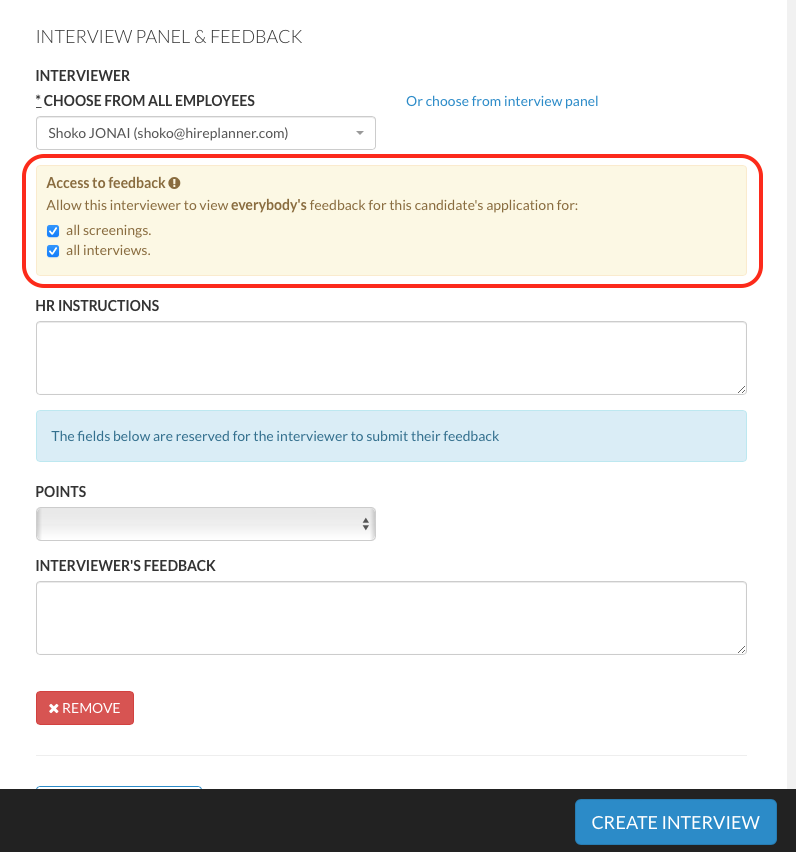
To allow some screeners or interviewers to have access to other people's feedback, the HR Recruiter will need to click on the appropriate check box to share either or both screening feedback and interview feedback (see visual attached below).
! ! IMPORTANT ! !
At the moment, you can allow someone either:
- Access ALL screening feedback for a candidate's application,
and / or
- Access ALL interview feedback for a candidate's application.
The current system does not allow users to access specific people's feedback. They can either access everyone's feedback or nobody's (depending on the setting).
Example:
- Let's assume we have 2 screeners (Mr A and Mr B) and 1 Interviewer (Mrs C)
- HR requests Mr. A and Mr. B to screen a candidate resume.
- If HR allows Mrs C (the interviewer) to access all screening feedback, she will be able to view both Mr A and Mr B's feedback. It is not possible (at the moment) to allow Mrs C to only access Mr A's feedback and not Mr B's feedback (or vice versa).
If you want to stop sharing feedback in the middle of the hiring process, you can simply go back and edit the screening or interview settings from the screening or interview records. As soon as the check boxes are unchecked, feedback will no longer be viewable.
Comments
0 comments
Article is closed for comments.