
Until now, whenever a recruitment agency introduced a candidate, HR Recruiters always had to process it in the database.
Thanks to this new upgrade, when HR Recruiters review agency introductions, they can now choose whether or not to process it and add the candidate information from the agents into the database.
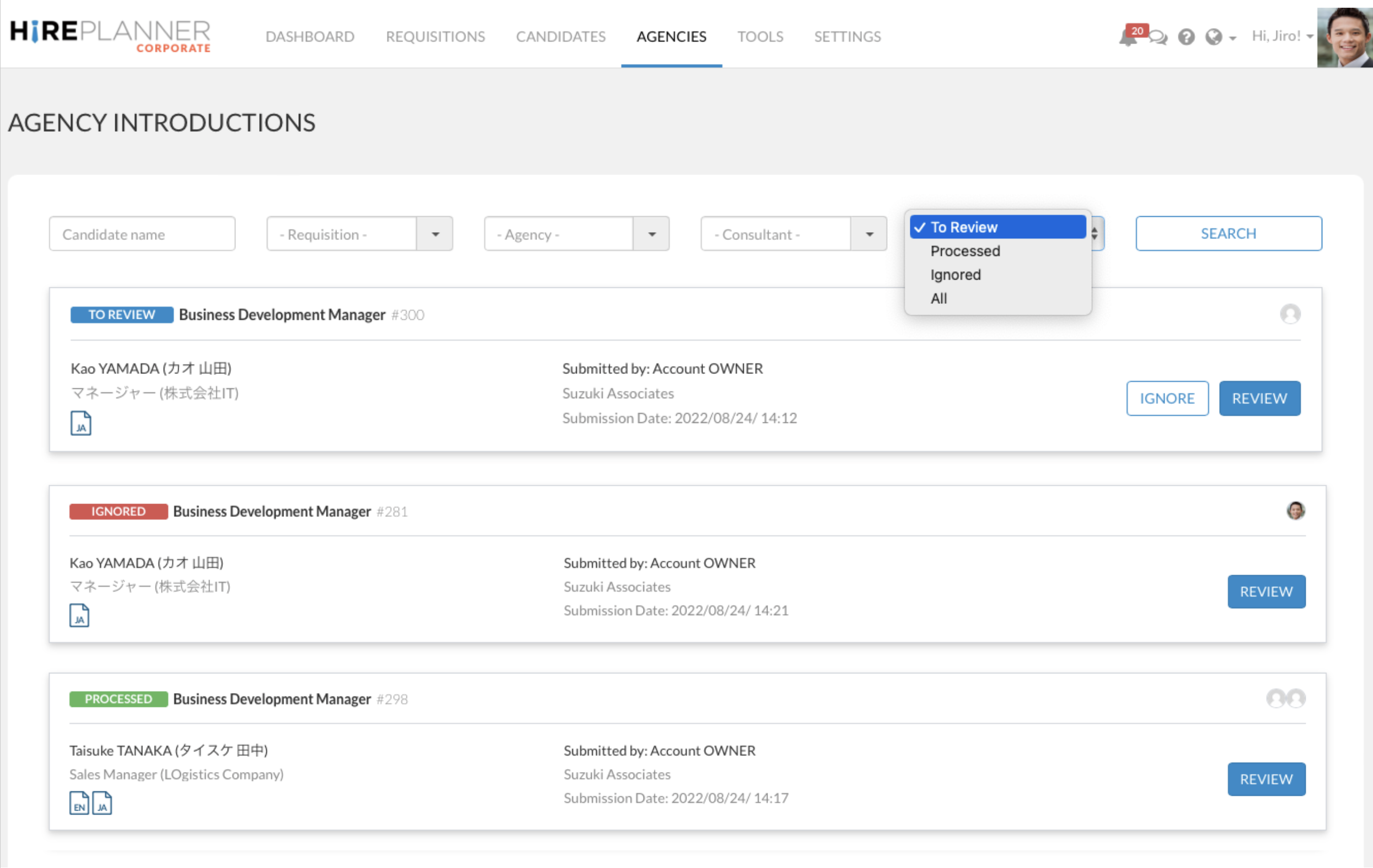
https://www.hireplanner.com/backend/introductions
✅ If you want to process an agency introduction, click on "REVIEW" and then select the button "PROCESS APPLICATION". Once you process a candidate introduction, it will create a candidate profile with an application record, and HR Recruiters will be able to chat with agents via the messenger tool.
❌ If you do not want to process an agency introduction (example: if a candidate is already in your database), please simply click on the "IGNORE" button. At the moment, it is not possible for HR Recruiters to chat via the messenger tool with the agents (if they don't process the candidate introduction) but we are looking into a solutions very soon.
The new design of the Agency Introduction section will allow you to filter agency introductions based on 4 filters:
- To Review (The candidate introductions that need to be reviewed)
- Processed (The candidate introductions that have already been processed)
- Ignored - NEW (The candidate introductions that have been ignored and were not processed)
- All (All candidate introductions sorted by date of introductions.
Comments
0 comments
Article is closed for comments.