
IF you forgot your password OR
IF you are signing in for the very first time as a non-HR user (e.g.: Hiring Manager or Interviewer),
You will need to reset your password in order to log in your HirePlanner account. To do so:
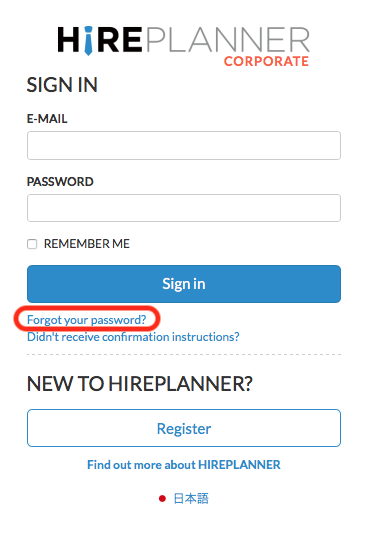
1) Visit the sign-in page and click on “Forgot your password” (see attached below)
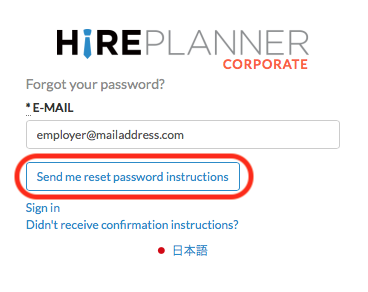
2) Submit your email address and click on “Send me to reset password instructions” button to receive the email message that will allow you to reset your password.
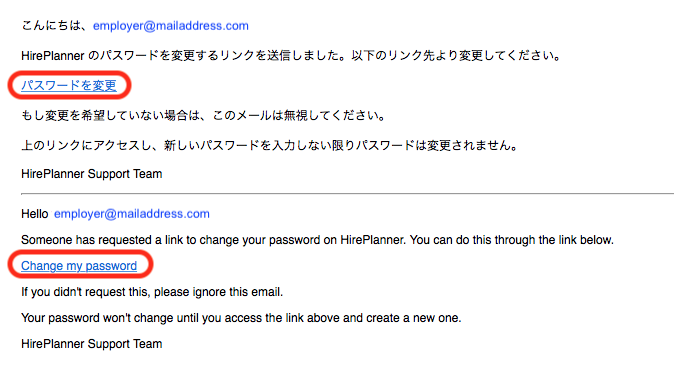
3) When you receive your "Reset password instructions" email, please click on the "Change my password" link
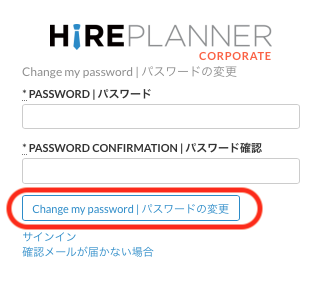
4) You will be re-directed to the following form. From there, please enter your new password in the "Password" field and click on the "Change my password" button to save your new password.
Remember to always choose passwords with a minimum of 8 characters (including capital and lower-case letters, numbers and symbols) and avoid any information that may be easily guessed (such as birthdays etc.)
Please keep your password confidential at all times. Using HirePlanner implies that you have been granted access to a certain amount of confidential corporate HR information. It is your responsibility to protect such data and ensure its confidentiality at all times.
For more information on security policy, please click here.
Comments
0 comments
Article is closed for comments.