
We have just released two new reports for you to download the following data:
- Your list of preferred agency partners and,
- Your list of agency consultants
You can now easily access those reports by following the steps described below:
1) Sign in from your employer account HERE:
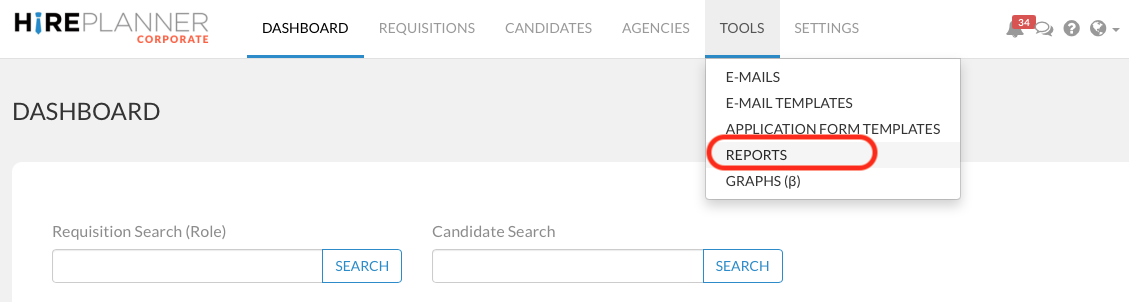
2) Click on TOOLS (on the top navigation bar)
3) Select REPORTS (on the drop down)
4) Select between the AGENCY LIST and the AGENCY CONSULTANTS LIST (see visual attached below)
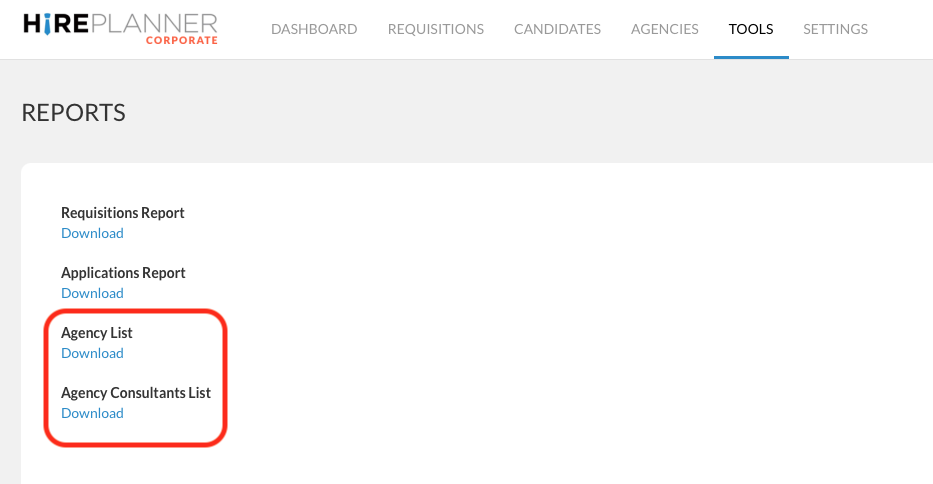
By clicking on the "AGENCY LIST", you will be able to download the list of all the agencies you have been working with so far (both activate agency partners and inactive agencies will be included in the downloaded report). The report will include the following information:
- Agency Name in English
- Agency Name in Japanese
- TEL number
- Fee Rate (%)
- Agency website URL
- Number of active consultants from the agency
- Account Owner Name in English
- Account Owner Name in Japanese
- Account Owner's email (contact details)
- Status (Active or not active)
- Notes
By clicking on the AGENCY CONSULTANTS LIST, you will be able to download the list of all the agency consultants you have been working with (both active and inactive consultants will be included in the downloaded report). The report will include the following data:
- Agency Name in English
- Agency Name in Japanese
- Consultant Name in English
- Consultant Name in Japanese
- Consultant email address
- Consultant telephone number
- Speciality (field of expertise) in English
- Speciality (field of expertise) in Japanese
- Account owner (Yes or No)
Comments
0 comments
Please sign in to leave a comment.